Wolfi is a Linux “undistro” maintained by Chainguard. It’s basically rolling-release Alpine, but with glibc instead of musl and no kernel. It’s the package set that Chainguard Containers are built on, and the selling point is zero-CVE, bleeding-edge images. Chainguard later decided that a bootable Wolfi was actually pretty useful, so they added systemd packages to Wolfi (rather than Alpine’s OpenRC) and kept the kernel and a few other bits in their private repos. The combination of public Wolfi and those private Chainguard repos is what they call Chainguard OS. The bulk of the package recipes and the build tooling are still in the open Wolfi project, though.
The images are built declaratively with apko. Each image is defined by a list of packages that apko assembles into a reproducible build. Packaging everything takes work, but it lets me update packages independently and trace files back to their source:
- Composability. You can bump one package without rebuilding any of the others. Only the changed APK gets rebuilt, and the next image includes it.
- Accountability. Every file in the image is owned by an APK with a version, a license, and a recipe you can read. Files use the usual
/usr/bin,/usr/liband/etcpaths, which makes debugging an unfamiliar image easier.
Docker are following a similar approach. Their new Hardened Images introduce a # syntax=dhi.io/build:1-alpine3.22 directive so an image is composed from a pinned package set instead of baked imperatively in a Dockerfile.
I got interested in making Wolfi bootable for two reasons. The first is that I love Alpine’s model in general, but musl and OpenRC are the parts I’d happily replace. The glibc vs musl debate is well documented. While I’ve used OpenRC and ifupdown-ng, I quite like systemd’s systematic and declarable approach to services, networking and tmpfiles. Wolfi keeps Alpine’s packaging conventions and swaps the two most controversial parts.
The big reason however is bootc’s requirement for systemd. It’s used by Bazzite and Universal Blue, the bootc-based Fedora derivatives marketed as atomic and robust to partial updates. For developers the attractive property is that you build it like you would do a container, and that you can distribute it via your regular (and free as in beer) container registries.
Chainguard’s commercial wrapper for the same idea is Chainguard VMs, except their immutable VM images assume you’re running on a cloud or a hypervisor, where a fresh boot image gets uploaded and swapped in via AMI-rotation or equivalent every time you want to update. bootc distributes updates through an OCI registry, and hosts update themselves in place regardless of where they’re running, whether bare metal or a VM, with a simple bootc update.
This post is how I added bootc support to Wolfi. So far it’s running on my homelab, my VPS on Vultr, my router, and I’m even trialing a bootc Wolfi desktop. I’m not affiliated with Chainguard, I just love their packages and tooling. The base result is ghcr.io/vaskozl/bootc, a public Wolfi-based bootc base image, published for amd64 and arm64. Here’s a node booted off one of the apko configs that extends it:
awry:~$ cat /etc/os-release && sudo bootc status
ID=wolfi
NAME="Wolfi"
PRETTY_NAME="Wolfi"
VERSION_ID="20230201"
HOME_URL="https://wolfi.dev"
BUG_REPORT_URL="https://github.com/wolfi-dev/os/issues"
  Staged image: ghcr.io/vaskozl/podman
        Digest: sha256:906a831d4492fc966f20c3e254cc5646fe894c0fec03152352e5da03d87e6e8a (amd64)
        Verity: f4e44bf9c878e9dd906a23bf6e72b77d304902a0dd2882c270198e557bed0363c5089ab34bcce92d89ceca3177b4a8bb5d0a5226cfc3d0885fea220a796ef0f7
     Timestamp: 2026-08-14T21:04:38Z

● Booted image: ghcr.io/vaskozl/podman
        Digest: sha256:8be45bc90e5545b1210e64d9f214e99909508eee1659ebf99465237a01bbbaa1 (amd64)
        Verity: 458c1750859d336284b74b8f335240241393213d5b57f4a24ca5c42ba3e58bb8fb5b785640b36fe7e100305859810c5a770cb6cc352a6cbad58c16bb412c0a6c
     Timestamp: 2026-08-12T15:22:42Z

  Rollback image: ghcr.io/vaskozl/podman
          Digest: sha256:ac9a53dad72eb15ba6d41143e6bbcf1f04a14418189b04247e218e49330873f0 (amd64)
          Verity: 131df206ab40d3044a9bd7d0a6c8678ae023d8a81a894579449294671185d164cd8f06d5c1a9edd3fd755212659efb329be757ecbe0e05c0ff9be928fb97ab50
       Timestamp: 2026-08-07T02:18:44Z
This is a headless Wolfi host running Podman, with an update staged for the next boot and the previous image available for rollback. The image, ghcr.io/vaskozl/podman:6.0.2, is defined in podman.yaml.
A few example images #
The base image is meant to be extended. Three I currently use:
-
niri.yaml, a full Wayland desktop based on the niri scrollable-tiling compositor, with Chromium, Foot, fonts, PulseAudio, Vulkan, AMD firmware. The whole desktop is one apko file:include: bootc.yaml contents: packages: - niri=26.04-r1 - chromium - foot - mesa - pulseaudio - linux-firmware-amdgpu - openssh-server-config - ...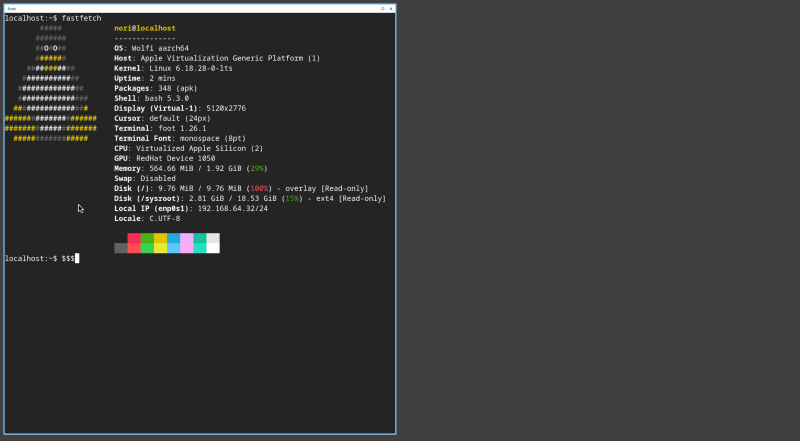
-
podman.yaml, headless, the one in thebootc statusblock above. This is what most of my homelab nodes run. -
pinewall-config.yaml, my router. There’s a section on this one further down.
Flashing one of these to disk #
Any image that include: bootc.yaml is itself a bootable container, whether that’s niri, podman, the router, or the bare base. So you can flash a full desktop straight from the registry:
fallocate -l 20G bootable.img

podman run --rm --privileged --pid=host -it \
  -v /etc/containers:/etc/containers \
  -v /var/lib/containers:/var/lib/containers \
  -v /dev:/dev \
  -v "$PWD":/data \
  ghcr.io/vaskozl/niri:latest \
  bootc install to-disk \
    --composefs-backend \
    --via-loopback /data/bootable.img \
    --filesystem ext4 \
    --wipe \
    --bootloader systemd
Trimmed output:
Copied "/usr/lib/systemd/boot/efi/systemd-bootaa64.efi" to "/tmp/.../EFI/BOOT/BOOTAA64.EFI".
Not booted with EFI or running in a container, skipping EFI variable modifications.
Trimming root
.: 12.7 GiB (13671964672 bytes) trimmed
Finalizing filesystem root
Unmounting filesystems
Installation complete!
dd the image to a USB stick, boot it, log in as nori/nori. The nori-user package ships a default user with password nori so first boot isn’t a chicken-and-egg situation. Then it’s:
ssh nori@<ip>
passwd                              # change the default
sudo hostnamectl set-hostname awry  # name it
Subsequent updates are sudo bootc update from inside the box, or fully unattended if you enable the bootc systemd timer.
Use ghcr.io/vaskozl/podman:6.0.2 for a headless host, or ghcr.io/vaskozl/bootc:latest to extend the bare base yourself (without a default user or .network files).
How nori-user works
#
The default user is set up by a tiny package that ships five static configuration files:
/usr/lib/sysusers.d/nori-user.conf
/usr/lib/tmpfiles.d/nori-user.conf
/usr/lib/systemd/system/systemd-sysusers.service.d/nori-user.conf
/etc/sudoers.d/nori-user
/etc/ssh/sshd_config.d/nori-user.conf
The user is declared with systemd-sysusers:
u nori 1000 nori /var/home/nori /bin/bash
m nori audio
m nori video
m nori render
systemd-tmpfiles creates the home directory at boot. The initial password is handed to systemd-sysusers as a credential via a service drop-in:
[Service]
SetCredential=passwd.plaintext-password.nori:nori
The user is materialised on first boot from /usr/lib/sysusers.d. The password is applied from the credential the first time the unit runs. Change it once and the new hash lives in writable state, and the credential is ignored on subsequent boots.
Everything except /etc/sudoers.d and /etc/ssh/sshd_config.d lives under /usr, so bootc updates those files with the image. Keeping the user configuration there also avoids the 3-way /etc merge.
The router is a package #
My router and its pinewall-config.yaml is based on Alex Haydock’s pinewall, which started life as an Alpine diskless mode image built with Alpine’s build scripts. Alex has since moved to apko himself, albeit still on Alpine and sans bootc. Mine is another include: bootc.yaml image, this time with blocky, dnsmasq, nftables, avahi and prometheus-node-exporter in place of podman. The pinewall-config package contains my entire router config tree, versioned like any other APK. The melange recipe is short, it copies a vendor/ directory full of config files into the package and sets the right permissions.
The only wrinkle is that some of those configs, /etc/hosts, /etc/resolv.conf, /etc/avahi/avahi-daemon.conf, are already owned by other packages. Drop-in directories would be ideal, but those three are single files, so the cleanest option is to claim them outright. apk’s replaces: directive does exactly that:
package:
  name: pinewall-config
  version: "0.0.10"
  ...
  dependencies:
    replaces:
      - 'avahi'             # for /etc/avahi/avahi-daemon.conf
      - 'wolfi-baselayout'  # for /etc/hosts
      - 'systemd-init'      # for /etc/resolv.conf
A version bump is a config change. A rollback is bootc rollback. The same pipeline builds and ships updates for both my Podman hosts and the router.
The apkontainer also leaves out systemd-default-network, since it’s a router and we want to configure interfaces individually. The pinewall-config package ships its own systemd-networkd files instead. The bare bootc.yaml base skips systemd-default-network for similar reasons (no sane DHCP-everywhere default for an unknown host shape), while podman.yaml and niri.yaml opt back in because they want stock networking.
Extending the base #
To make your own image, add another file to vaskozl/containers. Include bootc.yaml and list the packages you want to add.
If you can’t or don’t want to maintain an apkontainer, you can also use a Dockerfile:
FROM ghcr.io/vaskozl/bootc:1.15.2

RUN apk add --no-cache \
  systemd-default-network \
  openssh openssh-server-config openssh-service

# Add a user with an SSH key
RUN adduser -D alice && \
    mkdir -p /home/alice/.ssh && \
    echo 'ssh-ed25519 AAAA...' > /home/alice/.ssh/authorized_keys
systemd-default-network brings up common interfaces with systemd-networkd, and SSH gets you in. This works for a one-off image. For anything larger or more reusable, do it the nori-user way and package it properly as a melange recipe.
The missing host bits #
Wolfi doesn’t ship a kernel, an initramfs, or any of the other dependencies that bootc needs. Anything that isn’t already a Wolfi APK gets built with melange, which brings the .deb/.rpm model to Wolfi (controlled build environment, declared dependencies, a defined set of files). The packages I had to add:
linux-lts, repackaged from Alpine’slinux-stableAPK to get a known-good kernel quickly.dracutpluslinux-lts-initramfs, where the latter runsdepmodand producesinitramfs.imgat build time.ostreepluscomposefs, which givebootcits deployment and filesystem layout.bootcitself, built frombootc-dev/bootc.bootc-baselayout, which ensures/sysroot,/bootand friends exist in the host shapebootcwants.
A lot of the early bootc-on-Wolfi groundwork was done by the Bluefin folks at projectbluefin/wolfifin. My packages are a polished fork, kept up to date with Renovate.
With those packages available, the bootable apko config looks like this:
include: wolfi-base.yaml
contents:
  packages:
    - bootc=1.15.2-r1
    - ostree
    - composefs
    - systemd
    - systemd-boot
    - linux-lts
    - linux-lts-initramfs
cmd: init
stop-signal: SIGRTMIN+3
accounts:
  run-as: root
annotations:
  containers.bootable: "1"
That last annotation is the bit that turns an OCI image into a bootable container.
The update signal #
I let Renovate keep the =version pins fresh, but out of the box it doesn’t know how to ask an APK repository “what’s the latest version of niri?”. The fix is a tiny HTTP shim, renovate-apk-indexer, which reads APKINDEX.tar.gz and answers Renovate’s custom-datasource queries. I package it like everything else, see its apkontainer.
In GitLab CI the shim sits next to Renovate as a service:
renovate:
  image: ghcr.io/renovatebot/renovate:latest
  services:
    - name: ghcr.io/vaskozl/renovate-apk-indexer:latest
      alias: apk-wolfi
  script:
    - renovate
A custom datasource in renovate.json wires it up:
{
  "customDatasources": {
    "wolfi-base": {
      "defaultRegistryUrlTemplate": "http://apk-wolfi:3000/{{packageName}}"
    }
  }
}
A regex custom manager then picks pkg=version lines out of the apko YAMLs and Renovate opens MRs whenever they drift. CI rebuilds the images, the new digests land in ghcr, and bootc update picks them up on the hosts.
For my own melange packages I run the same shim against my private APK indices in Kubernetes as a proper daemon, so custom builds are tracked the same way as the public Wolfi ones.
How this compares to Chainguard OS #
I don’t really know. I’ve only used the free Raspberry Pi image. But a few things I can say.
First, I use linux-lts because I’ve struggled with several annoying networking bugs in the most bleeding-edge kernels. Second, I use the Alpine kernel as-is, so whatever extra hardening Chainguard does to theirs isn’t there. Third, I actually ship i915 and amdgpu firmware so the desktop image gets graphics acceleration out of the box.
bootc’s composefs store updates by layer. bootc only pulls the layers that actually changed, and apko makes that pay off because it splits packages into separate layers. The result is download deltas equivalent to individual package updates.
Lastly, my images are public, free to download, and even come in a desktop flavour.
Get started #
For a quick install, the Justfile in vaskozl/wolfi-bootc wraps the podman run from earlier so you can drive the niri image straight from a clone:
run *ARGS:
    podman run \
        --rm --privileged --pid=host \
        -it \
        -v /sys/fs/selinux:/sys/fs/selinux:Z \
        -v /etc/containers:/etc/containers \
        -v /var/lib/containers:/var/lib/containers \
        -v /dev:/dev \
        -v $PWD:/data \
        --security-opt label=type:unconfined_t \
        ghcr.io/vaskozl/niri:latest {{ARGS}}
just run bootc install to-disk ... then writes a niri image to a local file with the mounts already wired up.
The other repos:
- Base image:
ghcr.io/vaskozl/bootc - Apkontainers (
apkoconfigs):vaskozl/containers - Packages (
melangerecipes):vaskozl/wolfi-packages - Router config tree:
vaskozl/pinewall-config apkdatasource shim:hown3d/renovate-apk-indexer- Bluefin’s prior art:
projectbluefin/wolfifin
Further reading:
bootcbook, the canonical docsapkodocs, and in particular the layering referencemelangedocs- Fedora’s
bootcfilesystem guide - Chainguard OS overview